Server log analysis: what your servers know and Search Console does not
Server logs are the only source that says what engines actually requested. How to get them, what they reveal, and how to analyse them without storing a single IP address.
The NessFlow team (Product engineering, NessFlow) · · 4 min read
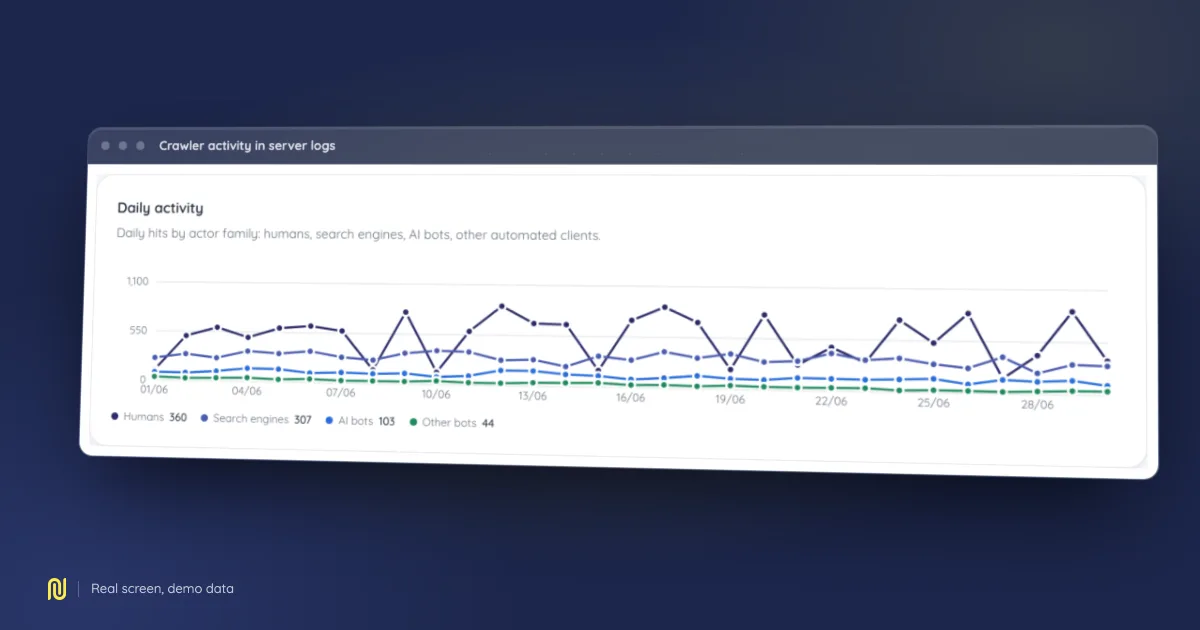
A real product screen, rendered on a fictional demo dataset: the figures shown belong to no client.
Search Console tells you what Google chose to tell you, sampled and rounded. Your server logs tell you what actually happened, request by request. When the two disagree, the logs are right, and that disagreement is often the most useful finding in an entire audit.
What you will not see anywhere else
Real crawl budget. Nobody publishes it. You infer it from observed behaviour: how many distinct pages a crawler requests per day, how often it comes back, and where it spends its time. The most common finding is depressing and actionable: the majority of an engine's requests land on pages with no value, filters, sort parameters, deep pagination.
Ghost pages. URLs engines request regularly that appear in no crawl of your site. Old removed pages, forgotten parameters, inbound links from third parties. They burn budget and often answer with an error.
Live orphan pages. The reverse: pages receiving human traffic while no internal link leads to them. They survive on an external link or a bookmark, and a redesign kills them without anyone noticing.
The real human/crawler split. On many sites half the traffic is not human. Sizing infrastructure without knowing that means paying for robots.
Getting the logs
Depending on your hosting:
- Classic server (nginx, Apache):
/var/log/nginx/access.log*, usually rotated and compressed daily. - CDN in front of the origin: ask for the CDN logs. Origin logs only see what the cache let through, which distorts every crawler count.
- Shared hosting: a control panel generally offers an archive.
Two things to settle before asking:
- The window. A month is a good start; a week is not enough to see a return frequency.
- The format. Combined, common, or custom: write it down, because field order is not reliably guessable.
The blocker nobody talks about: IP addresses
A server log contains IP addresses. Under GDPR those are personal data. This is why many teams never analyse their logs at all: IT refuses to ship them to a third party, and nobody has time to build an internal pipeline.
The right answer is not to work around the question, it is to not keep the address. The address serves two purposes at processing time: telling one visitor from another to count sessions, and verifying that a crawler is who it claims to be. Both are done in flight, without writing the address anywhere.
That is the choice we made: the parser reads, aggregates, and writes no IP address to the database. None is sent to a model. Uploaded files are deleted after processing.
If you build your own pipeline, that is the line to put in your spec: the address may be read, it may not be retained.
What you get, in order
1. Split crawlers from humans
Filtering on the user agent alone is not enough: the string is declarative. For major crawlers, verify the claim with a reverse then forward DNS lookup, the method Google and Bing both document. Without it, your Googlebot count includes everything pretending to be Googlebot.
2. Group responses by status code
A spike of 404s on URLs a crawler requested is budget spent on nothing. A spike of 5xx during a crawl window is far worse: that is the signal that makes an engine slow down, sometimes for weeks.
3. Cross-reference with the crawl
This is where logs earn their keep. Three joins, on the same normalised URL:
- crawled, never requested by an engine → a discovery problem, usually internal linking;
- requested by an engine, absent from the crawl → a ghost page;
- requested and crawled, but absent from Search Console → an indexing problem, not a crawling one.
The third case is the one that most often changes a team's diagnosis, because it changes the work: stop asking why the crawler is not coming, and start asking why the page is not being kept.
4. Look at where the budget goes
Group crawler requests by directory or URL pattern. If a third of the requests land on filter combinations, you have your project, and it usually pays better than any content optimisation.
The volume trap
Logs are big: several gigabytes for a month on an active site. Two practical consequences.
You have to stream. Loading a file into memory to parse it works right up until it does not, and the failure lands in production on your largest client.
You have to compact aggregates. Keeping line-level data forever serves nothing: past a few weeks what you re-read is an hourly, then a daily aggregate. Decide retention before you import, not after.
What it does not tell you
Logs say what was requested, not what was done with it. A crawled page is not an indexed page; an indexed page is not a displayed page. Cross-referencing with Search Console is still needed for step two, and nothing fully answers step three.
That is the honest limit of the exercise, and it beats a dashboard that pretends otherwise.