robots.txt for AI crawlers: the complete configuration, crawler by crawler
Allow search, refuse training, understand the tokens that match no crawler at all: the procedure, with snippets to copy and the four mistakes we find most often.
The NessFlow team (Product engineering, NessFlow) · · 5 min read
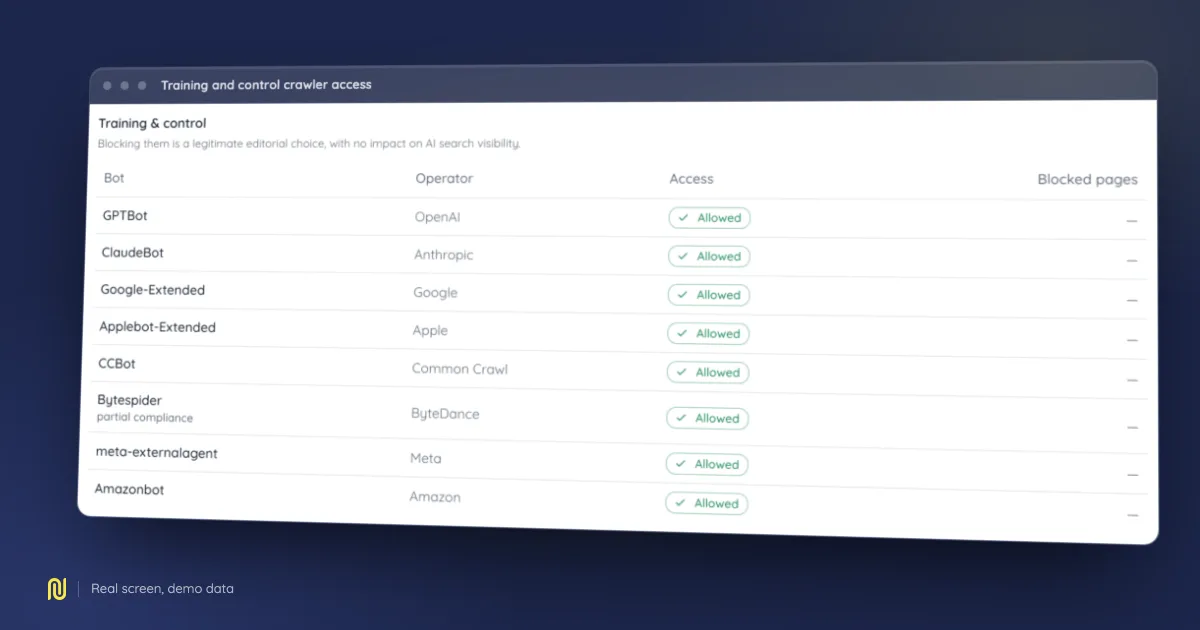
A real product screen, rendered on a fictional demo dataset: the figures shown belong to no client.
Most sites we audit have a robots.txt written five years ago, topped up since with lines copied off a forum. The result is nearly always the same: one AI search crawler blocked by accident, one training crawler allowed by oversight, and nobody in a position to notice.
This procedure rebuilds the file from scratch, in three decisions.
Decision 1: Separate the purposes
Model operators' crawlers do not all do the same thing, and lumping them together is the mistake that costs the most.
Search. These crawlers feed cited answers with their sources. Blocking them removes you from citations. It is the most expensive line in the whole file, and often the one taken by default when someone copies a block list found online.
User request. These agents fetch one specific page because a human just asked for it. Traffic is low and deliberate. Blocking them means declining to answer someone who is looking for you.
Training. These crawlers collect content to train models. Blocking them is a perfectly legitimate editorial choice with no direct effect on your citations. It is the one case where saying no costs you no visibility.
Control tokens. Google-Extended and Applebot-Extended are not crawlers: no request ever carries those names. They are tokens the operator recognises in robots.txt to govern a use: at Google, the use of content by Gemini. Blocking Google-Extended does not affect your presence in search results or in AI overviews, both of which depend on Googlebot. This is the most widespread confusion in the field.
Decision 2: Pick your policy
Three coherent policies, chosen on what you sell.
Policy A: open. Everything allowed. The right call when your content is an acquisition asset: documentation, guides, product pages. You want to be read, cited and quoted.
Policy B: search yes, training no. You accept being cited, you decline to feed training. This is the most common position among publishers and media.
Policy C: closed. You refuse everything. Own the consequence: you disappear from cited answers. Defensible for an intranet or a site under contractual constraint; rarely defensible for a commercial site.
Decision 3: Write the file
Here is policy B, the most common. Adapt it by moving tokens between blocks.
# Search and user-initiated fetches: allowed
User-agent: OAI-SearchBot
User-agent: ChatGPT-User
User-agent: Claude-SearchBot
User-agent: Claude-User
User-agent: PerplexityBot
User-agent: Perplexity-User
User-agent: Amzn-SearchBot
User-agent: DuckAssistBot
User-agent: MistralAI-User
Allow: /

# Training: refused
User-agent: GPTBot
User-agent: ClaudeBot
User-agent: CCBot
User-agent: Bytespider
User-agent: meta-externalagent
User-agent: Amazonbot
Disallow: /

# Control tokens: refusing a use, with no effect on crawling
User-agent: Google-Extended
User-agent: Applebot-Extended
Disallow: /

# Everything else
User-agent: *
Allow: /

Sitemap: https://example.com/sitemap.xml
The four mistakes we keep finding
1. Assuming groups stack
They do not. A crawler applies one group: the most specific one that names it. If you write a User-agent: * group with five Disallow lines for technical directories, then a GPTBot group with a single Disallow: /private, GPTBot applies none of the first five.
Practical consequence: the moment you name a crawler, its group has to be complete.
2. Blocking Google-Extended to opt out of AI overviews
Google's AI overviews are served through Googlebot. Google-Extended governs a different use. That block changes nothing about what you thought you were opting out of, and removes something you were not trying to remove.
3. Relying on robots.txt against an agent that ignores it
Some user-initiated fetchers do not apply it, by design. If you genuinely have to stop them, that happens server-side, and not on the user agent string alone, which is declarative and trivially forged. Blocking on it stops the honest crawlers and nobody else.
4. Serving robots.txt with a 4xx status
The quietest failure on this list, and one we hit on our own site. A web server can claim the /robots.txt path before your application ever sees it, answer 404, and let an error page be rendered in its place. The file "exists", your framework lists the route, and crawlers read no rules at all, and ignore the Sitemap: directive it carried.
The check that actually fires: request the URL and read the status code, not just the body.
Verify
Three checks, in order:
curl -sI https://your-domain/robots.txt→ status 200,text/plain.- Re-read each group asking: does this crawler apply this group and only this group?
- Confirm the
Sitemap:directive points at a URL that answers. - Request a page while presenting yourself as the crawler (
curl -A "<crawler token>" -sI https://your-domain/) and read the status you get back. It is the only one of the four checks that asks what your server SERVES rather than what your file DECLARES.
That fourth check deserves a word, because it catches the most frustrating failure on this subject: a crawler your robots.txt allows perfectly, turned away all the same. A web application firewall, a rate limit, a country block, an anti-scraping rule set two years ago: none of them reads your file, and all of them answer before it does. The declaration is correct, and the door is shut.
Your logs will not settle it either, and that is the trap inside the trap: a crawler missing from the logs does not separate "it never came" from "it came, and it was turned away at the door". Both read as silence. Only an active request, made under the crawler's identity, tells the two apart.
The rest (knowing which crawlers actually reach your pages, and whether your brand is cited in answers) needs measurement tracked over time. But no measurement will rescue a file that blocks what you meant to allow.