EAA, WCAG, VPAT: what accessibility compliance actually asks of a web team
Three acronyms, three different legal natures, and one expensive confusion. What each one requires, what an automated check can prove, and what will always need a human.
The NessFlow team (Product engineering, NessFlow) · · 4 min read
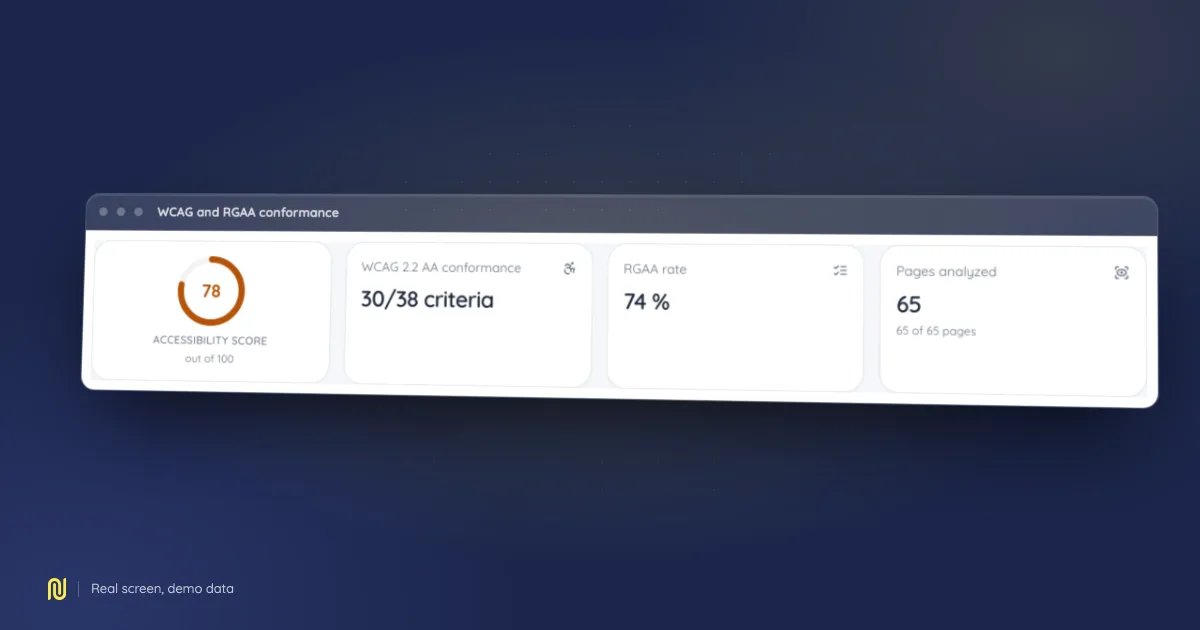
A real product screen, rendered on a fictional demo dataset: the figures shown belong to no client.
Digital accessibility went from a design-team topic to a contractual obligation in a few years. Tenders ask for it, legal departments verify it, and web teams meet three acronyms presented to them as equivalent when they are nothing of the sort.
Three texts, three natures
WCAG is an international technical recommendation. It defines testable criteria across three conformance levels: A, AA, AAA. Version 2.2 is the current reference. It is not a law: it is the reference laws point at.
EAA (European Accessibility Act) is an EU directive. You do not read it directly: it applies through national transposition, each with its own deadlines, penalties and exemptions. It is the text that put the subject into contracts.
RGAA is the French framework. It restates the WCAG criteria and adds what a recommendation lacks to be enforceable: a test method, criterion by criterion, and a conformance declaration format. That difference is the one that matters: it says how to verify, not only what to respect. If you sell into France, this is the document your client will ask for.
VPAT is none of the above. It is a standardised, US-originated document in which a vendor states for itself how far its product conforms. A VPAT is not a certification: it is a supplier declaration, with the liability that implies.
The most expensive confusion we see: believing a completed VPAT equals compliance. It equals a vendor commitment, which is a different thing.
What an automated check can prove
Everyone asks this and few vendors answer straight.
An automated engine settles, with certainty, a minority of the criteria. The rest require human judgement. The split follows from the nature of the criteria, not from the quality of the tool.
Decidable without a human:
- a missing text alternative on an image;
- an insufficient contrast ratio between text and background;
- a form control with no associated label;
- an incoherent heading hierarchy;
- a missing or wrong language attribute;
- invalid or contradictory ARIA roles.
Not decidable without a human:
- whether a text alternative is relevant: a tool sees that it exists, not that it describes the image;
- reading order when it differs from source order;
- whether an error message is actually clear;
- real keyboard usability on a complex component;
- conformance of video and audio content.
A vendor advertising "automated compliance" is selling an impossibility. What a tool brings is handling the mechanical share on every release, across every page, without fatigue, and freeing human time for the criteria that demand it.
The rendering trap
One technical mistake deserves isolating: auditing the initial HTML instead of the rendered page.
On a modern application the HTML the server sends is often an empty shell. An audit reading it finds a nearly perfect page, because there is nearly nothing to find. The real errors appear after JavaScript runs, in the final DOM.
The check that fires: compare the number of interactive elements your tool reports against what you see on screen. If it finds three on a page with forty, it is reading the wrong document.
What you have to produce
For a tender or a legal review, three artefacts:
- A dated audit, criterion by criterion, with the test method used.
- A conformance declaration in the expected format: RGAA in France, VPAT for a US buyer.
- A remediation plan for what remains, with dates. Nobody expects one hundred per cent on day one; they expect you to know where you are and where you are going.
The part that costs time is never producing the document: it is working out, six months later, which pages were tested and when. Hence the rule we apply to every report we generate: a frozen measurement carries the configuration that produced it. Without that nothing is comparable after a scope change, and the declaration becomes unverifiable, including by you.
Where to start
In this order:
- Measure on the rendered page, not the initial HTML, on your most-visited pages.
- Fix contrast and form labels first. They are the two most frequent families, the cheapest to fix, and the ones blocking the most users.
- Run a human review of the critical journeys: sign-up, checkout, search. A site that conforms on its static pages and fails in its funnel does not conform.
- Write the declaration, with its remaining gaps and their dates.
It takes longer than buying a badge. It is also the only version that survives a challenge.